Gantt Charts for Trello
Visualize your Trello boards as clear project timelines. No data migration needed. Just easier ways to see your work.

What is Gantt charts (by Placker)?
Transform your boards into professional Gantt chart timelines with automatic task dependencies, resource planning, and multi-board views and portfolio timelines. Visualize the critical path using the Gantt Charts (by Placker) Power-Up.
✨ Key Features
- Generate Gantt charts automatically based on cards planned start and end dates
- Create task dependencies with drag-and-drop and automatic scheduling
- Balance team workload using the resource planner
- Automatically calculate critical path and project duration
- Communicate project status with exportable timelines
- Visualize multiple boards on one master Gantt timeline
👥 Perfect For
- Project managers coordinating complex multi-phase projects
- Team leads managing multiple workstreams simultaneously
- Product teams aligning engineering, design, and marketing timelines
- Agency teams balancing team capacity across clients
- Marketing teams planning campaign launches and events
- Construction and manufacturing teams with sequential dependencies
Start with a 15-day free trial. Get started in minutes. No credit card required.
Trusted by teams worldwide
See what our customers have to say
"Wow. What a great combination Trello and Placker. I have tried all manner of Trello Gantt Power-Ups and extensions. None are in the same galaxy as Placker. Please keep up the great work."
"I love how I can visually see all the tasks that need to be done and the ease that I can just drag and drop these project checkpoints into new positions and easily make achievable deadlines for myself, also LOVING the time commitment tracker at the bottom, to give a more realistic picture about how much work can be done during the work day."
"This might be the best project management program I've ever used. Good job!"
"You can see multiple boards at a higher level by installing the Placker power-up in Trello in a concise and user-friendly view."
"Your product is pretty awesome. It's a huge step in the right direction to allow us to keep using Trello, but also to get a Gantt chart."
"Fast, reliable, and impressively comprehensive. The configuration options exceeded my expectations."
"It's simply awesome. Combined boards let me see overall tasks progress between projects, work better and be more productive."
"The Gantt chart functionality is fantastic! It makes project tracking so much easier."
"I am loving Placker. First of all, i can use it online, without needing to install anything. Secondly, i use a lot Trello for engineering projects, so they synergize perfectly. Congratulations to you all."
"The Gantt chart offered a comprehensive birds-eye view of my project, enabling me to streamline the planning process. Its numerous functionalities ensured that I could easily organize and monitor the various stages of my research."
"I use trello extensively and have been waiting for ages for a gantt plugin to work. Tried two other ones, but they were very buggy and messy. Placker is intuitive and I have yet to experience any bugs in my trello+placker workflow. Love it! Actually I'm so excited I've been telling a bunch of friends and colleagues about it since I tried it out. I just LOVE Placker already, and have organized our planning in it. Will definitely be a long term user."
"Thank you for this amazing tool, it has already improved the way we track and execute big complex projects."
Gantt Chart
Transform Cards into Visual Timelines
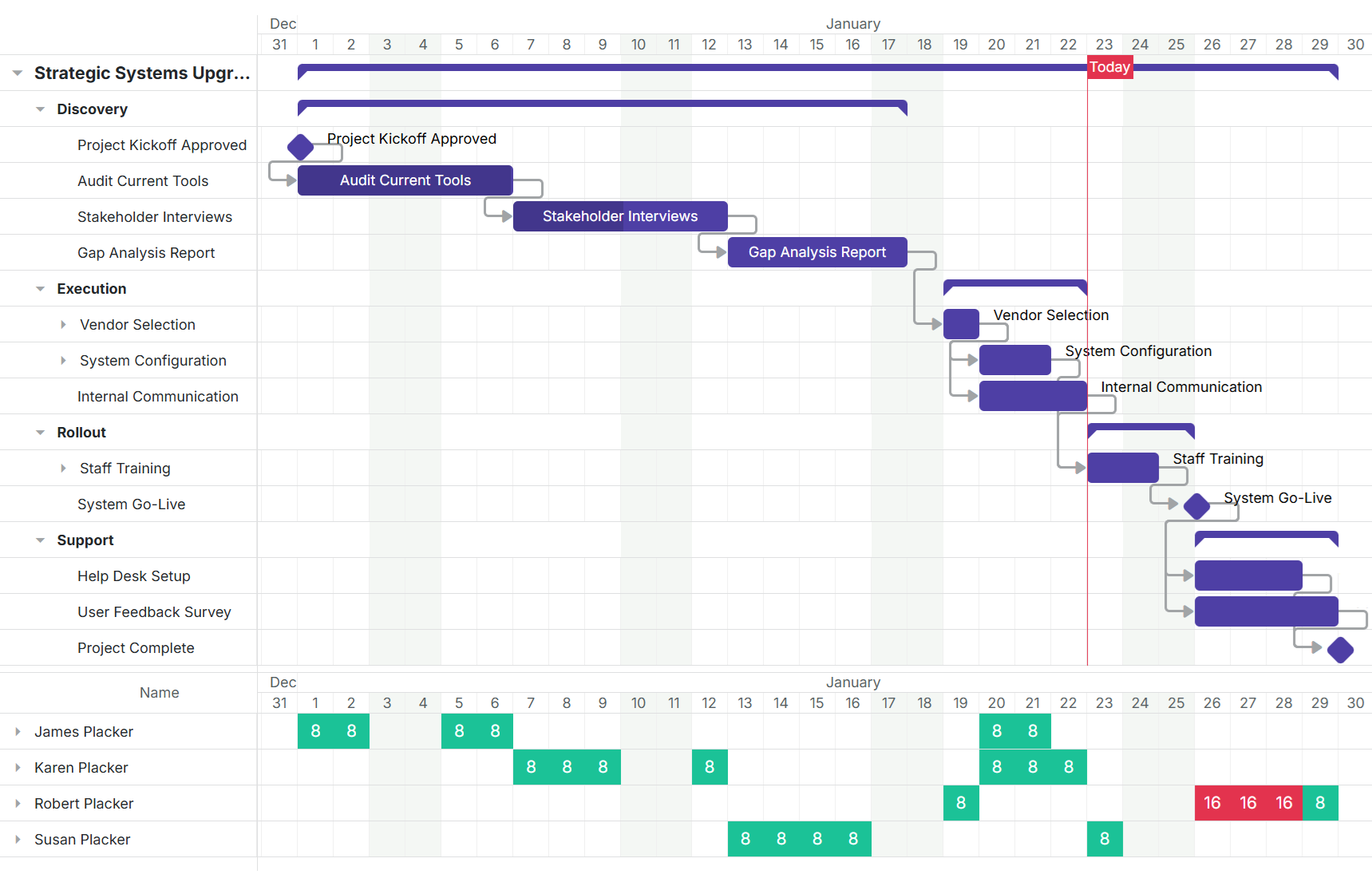
Transform your Trello cards and checklist items into a visual Gantt chart timeline. Visualize critical paths with automatic scheduling and milestone tracking.
- Visualize planned timelines of cards and checklist items
- See your Trello cards and checklist items displayed on a visual timeline. Understand exactly when work is planned to start and end.
- Flexible layout and filtering to fit your workflow
- Display your Gantt chart grouped by member, list, label, or other criteria. Filter to focus on what matters most to you.
- Export and share Gantt charts as images
- Export your Gantt chart as an image to share with stakeholders, include in presentations, or attach to reports.
Automatic Scheduling
Smart Task Dependencies
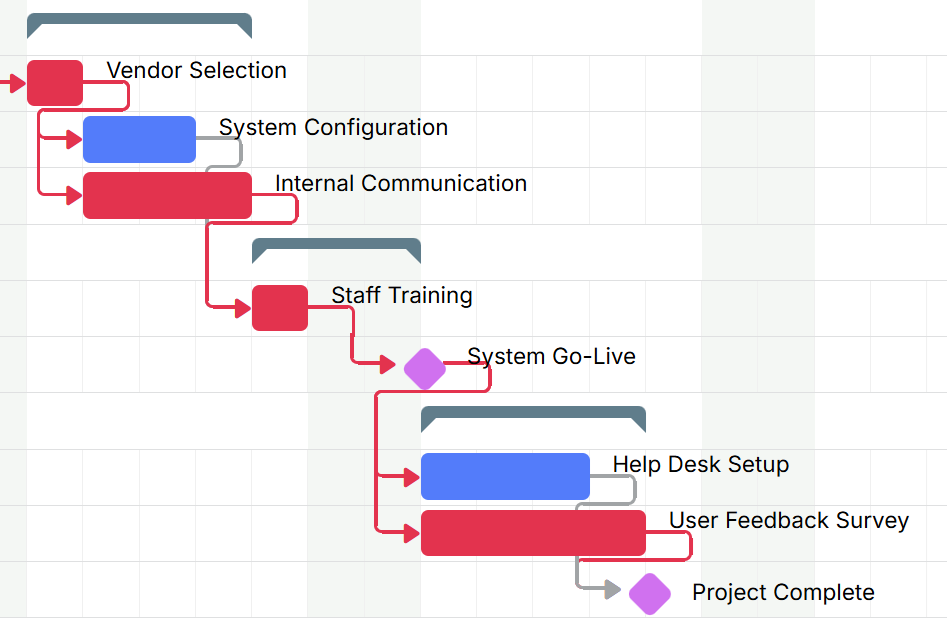
Connect cards with a simple drag-and-drop. When dates change, dependent tasks automatically adjust. No manual updates needed.
- Drag-and-drop dependency creation
- Create dependencies by simply dragging from one task to another. Predecessor and successor relationships made easy.
- Automatic task rescheduling when dates change
- When a task's dates change, all dependent tasks automatically reschedule. Your timeline stays accurate without manual work.
- Critical path calculation shows project impact
- Instantly see which tasks impact your project completion date and where delays will cause problems.
Team Management
Resource Planning That Works
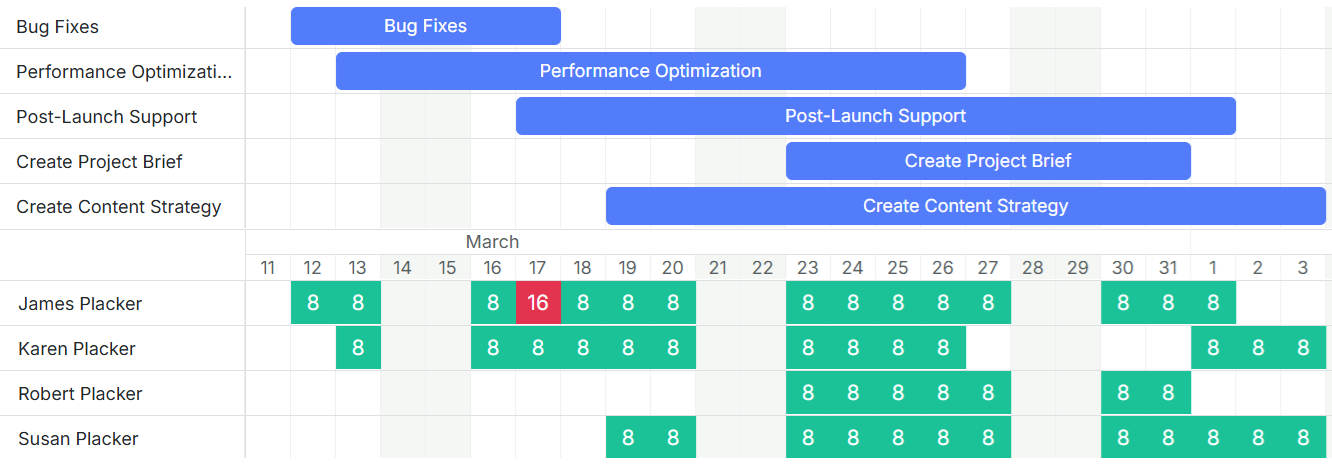
See who's doing what and when. Prevent overallocation before it happens with intuitive workload visualization and resource leveling.
- Visualize team workload and capacity at a glance
- See each team member's capacity and current allocation at a glance. Identify bottlenecks before they impact delivery.
- Automatic resource leveling across team
- Automatically balance work across your team with crashing and fast tracking techniques for optimal resource utilization.
- Plan future work with confidence
- Plan future work with confidence knowing exactly how much capacity your team has available.
Portfolio Management
Multi-Board Timeline View
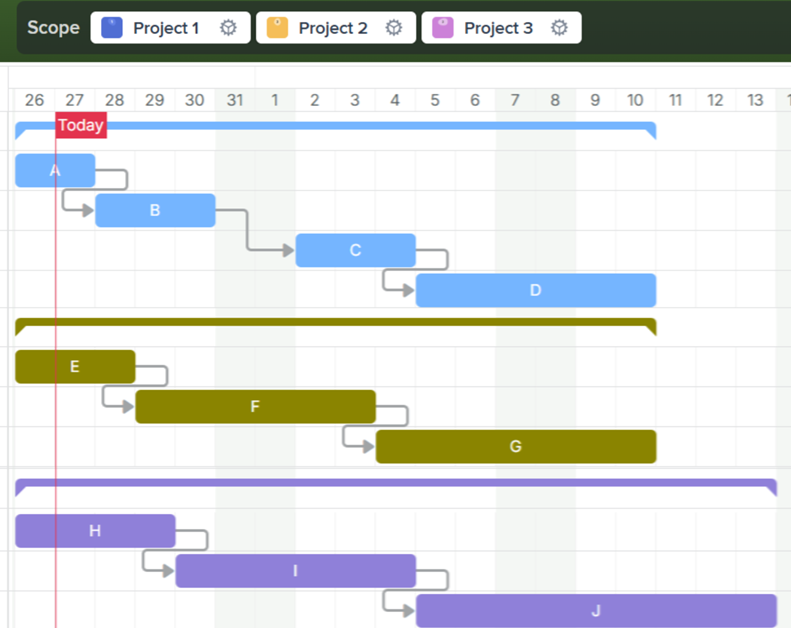
Combine multiple Trello boards into a single roadmap. Master boards with Gantt chart timeline. Perfect for portfolio management, program oversight, and aligning distributed teams.
- See all projects on a single timeline
- See all your projects on a single timeline. No more switching between boards to understand the big picture.
- Color-coded projects for easy identification
- Each board gets its own color for easy visual distinction across your portfolio.
- Filter and focus on specific teams or projects
- Drill down into specific teams, projects, or time ranges without losing context.
Ready to supercharge your Trello boards?
Start your 15-day free trial today. No credit card required.